Colors#
The cmap.Color type represents an individual color.
from cmap import Color

# argument can be any "ColorLike".  See rules below
red   = Color('red')
red2  = Color('#FF0000')
red3  = Color('rgb(255, 0, 0)')
red4  = Color('hsl(0, 100%, 50%)')
red5  = Color((255, 0, 0))
red6  = Color((1.0, 0.0, 0.0))
red7  = Color([1.0, 0.0, 0.0])
red8  = Color(np.array([1.0, 0.0, 0.0]))
red9  = Color(0xFF0000)
red10 = Color(16711680)
ColorLike objects#
The following objects can be interpreted as a color, and used as the first argument to the Color constructor; cmap refers to these objects collectively as "ColorLike".
Briefly, valid arguments are of type:
strtuple[float | int, float | int, float | int]tuple[float | int, float | int, float | int, float]Sequence[int | float]numpy.ndarrayNoneintcmap.Colorpydantic_extra_types.color.Colorcolour.Color
In detail:
-
A string containing a color name. All CSS color names are supported, case is ignored along with spaces, underscores and dashes (see complete list below.)
'red''slategray'
-
A string containing a 3, 6, or 8-digit hexadecimal color code:
'#0F5'(RGB)'#00FF55'(RRGGBB)'#00FF55FF'(RRGGBBAA)
-
A string containing a valid css
rgb(a)orhsl(a)color:'rgb(255, 0, 0)''rgb(100%, 0%, 0%)''rgba(255, 0, 0, 0.5)''rgba(255, 0, 0)'(it's ok to usergbawithout an alpha value)'rgba(100%, 0%, 0%, 0.5)''hsl(180, 100%, 50%)''hsla(180, 100%, 50%, 0.5)''hsla(180, 100%, 50%)'(it's ok to usehslawithout an alpha value)
-
A
tuplecontaining 3intvalues between 0-255 (for RGB), or 3 int values and afloatalpha value from 0-1 (for RGBA). (Note: the alpha value is always a float between 0-1).(0, 128, 255)(0, 128, 255, 0.5)
-
A
tuplecontaining 3 or 4floatvalues (see note on ambiguity below):(0.0, 0.5, 1.0)(0.0, 0.5, 1.0, 0.5)
Ambiguities with tuples of 0 and 1
While it's nice to support both the 8-bit and float inputs, there is ambiguity in the case of a tuple of integers containing only zeros and ones (e.g.
(0, 0, 1)). The convention incmapis to treat a tuple of all integers as 8-bit RGB values, and a tuple with any floats (excepting the 4th alpha value) as float RGB values, so(0, 0, 1) == (0, 0, 1/255) == '#000001'(0, 0, 1.) == (0, 0, 255) == '#0000FF'
 To avoid ambiguity, it's best to use float values.
 Overflow
In all cases, numeric values are clipped to their valid range, so
(0, 300, 0, 2.0)is equivalent to(0, 255, 0, 1.0), and(0.0, 1.5, 0.0, -0.5)is equivalent to(0.0, 1.0, 0.0, 0). -
A
numpy.ndarraywith shape(3,)or(4,): where integer dtypes are interpreted as 8-bit color values (from 0-255) and float dtypes are interpreted as float color values (from 0-1). For colors with alpha, you must use a float dtype.np.array([0, 128, 255])(8-bit RGB)np.array([0.0, 0.5, 1.0])(float RGB)np.array([0.0, 0.5, 1.0, 0.5])(float RGBA)- NOT:
np.array([0, 128, 255, 0.5])(the 0.5 makes this evaluated as a float color, which will be clipped to (0, 1., 1., 0.5))
-
The literal
None, interpreted as transparent black (i.e.(0, 0, 0, 0)) -
A single integer value: interpreted as a 24-bit integer RGB color value, where the first 8 bits are the red channel, the next 8 bits are the green channel, the last 8 bits are the blue channel (alpha values other than 1 aren't supported in this mode). This is most convenient when expressing integers in base-16.
0xFF0000(red, in base 16 integer form)16711680(also red, but in the default base 10 integer form)0xFF00FF(magenta, in base 16 integer form)16711935(also magenta, but in the default base 10 integer form)
Note
Base-16 integers look the same as their hexadecimal color string representation, but lack the quotes, and are preceded by
0xinstead of#. -
An instance of
cmap.Coloritself: which is returned unchangedColor(Color('red')) is Color('red')
-
(Third-party object): An instance of
pydantic_extra_types.color.Color. -
(Third-party object): An instance of
colour.Color
Usage#
See Color class API for complete details, highlights are listed here:
from cmap import Color

trq = Color("turquoise")
Useful properties#
Convert to a variety of forms:
trq.hex          # '#40E0D0'
trq.rgba         # RGBA(r=0.2510, g=0.8784, b=0.8157, a=1)
trq.hsl          # HSLA(h=0.4833, s=0.7207, l=0.5647, a=1)
trq.hsv          # HSVA(h=0.4833, s=0.7143, v=0.8784, a=1)
trq.rgba8        # RGBA8(r=64, g=224, b=208, a=1)
trq.rgba_string  # 'rgb(64, 224, 208)'
trq.name         # 'turquoise'
Useful magic methods#
Comparing a color to anything will attempt to cast the other object:
trq == "turquoise"  # True
# colors are cached, so equal colors are the same object
trq is Color((64, 224, 208))  # True
Tip
The internal representation of Color is a 4-tuple of float values from 0-1 (RGBA). In general, you can assume that sequence-based methods will return those values.
Color implements __array__ so it behaves as an ArrayLike object:
np.asarray(trq) # array([0.25098039, 0.87843137, 0.81568627, 1.])
You can iterate it
list(trq) # [0.25098039, 0.87843137, 0.81568627, 1]
.. or index it:
trq[:2] # (0.25098039215686274, 0.8784313725490196)
Object Caching#
Note that Color objects are cached after creation and the same object instance is returned for equivalent inputs. This means that you can use is to compare colors, and that you can use Color objects as dictionary keys.
assert Color("red") is Color((255, 0, 0))
Immutability#
All colors are immutable and cannot be modified after instantiation.
trq.name = "foo" # AttributeError: Color is immutable
Usage with pydantic#
Color can be used as a field type in pydantic models. Fields accept any ColorLike value, and serialize to a color string:
from pydantic import BaseModel
from cmap import Color


class Foo(BaseModel):
    color: Color


foo = Foo(color="red")
foo.color is Color("red")  # True

Foo(color=(0, 11, 23)).model_dump_json()  # '{"color":"#000B17"}'
This also works in psygnal.EventedModel.
pydantic v1
With pydantic v1, Color fields validate the same way, but serializing to JSON requires an encoder:
class Foo(BaseModel):
    color: Color

    class Config:
        json_encoders = {Color: str}
Rich repr#
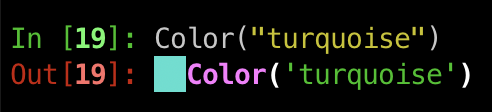
If you use rich pretty printing, Color objects have a nice repr that shows the color in the terminal
from rich import pretty

pretty.install()
Recognized Color Names#
The following names may be used as string inputs to the Color constructor.
(case insensitive; spaces, dashes, and underscores are ignored)
#000000rgb(0, 0, 0)also: k#808080rgb(128, 128, 128)also: grey#C0C0C0rgb(192, 192, 192)#FFFFFFrgb(255, 255, 255)also: w#800000rgb(128, 0, 0)#FF0000rgb(255, 0, 0)also: r#800080rgb(128, 0, 128)#FF00FFrgb(255, 0, 255)also: magenta, m#008000rgb(0, 128, 0)#00FF00rgb(0, 255, 0)also: g#808000rgb(128, 128, 0)#FFFF00rgb(255, 255, 0)also: y#000080rgb(0, 0, 128)#0000FFrgb(0, 0, 255)also: b#008080rgb(0, 128, 128)#00FFFFrgb(0, 255, 255)also: cyan, c#FFA500rgb(255, 165, 0)#F0F8FFrgb(240, 248, 255)#FAEBD7rgb(250, 235, 215)#7FFFD4rgb(127, 255, 212)#F0FFFFrgb(240, 255, 255)#F5F5DCrgb(245, 245, 220)#FFE4C4rgb(255, 228, 196)#FFEBCDrgb(255, 235, 205)#8A2BE2rgb(138, 43, 226)#A52A2Argb(165, 42, 42)#DEB887rgb(222, 184, 135)#5F9EA0rgb(95, 158, 160)#7FFF00rgb(127, 255, 0)#D2691Ergb(210, 105, 30)#FF7F50rgb(255, 127, 80)#6495EDrgb(100, 149, 237)#FFF8DCrgb(255, 248, 220)#DC143Crgb(220, 20, 60)#00008Brgb(0, 0, 139)#008B8Brgb(0, 139, 139)#B8860Brgb(184, 134, 11)#A9A9A9rgb(169, 169, 169)also: darkgrey#006400rgb(0, 100, 0)#BDB76Brgb(189, 183, 107)#8B008Brgb(139, 0, 139)#556B2Frgb(85, 107, 47)#FF8C00rgb(255, 140, 0)#9932CCrgb(153, 50, 204)#8B0000rgb(139, 0, 0)#E9967Argb(233, 150, 122)#8FBC8Frgb(143, 188, 143)#483D8Brgb(72, 61, 139)#2F4F4Frgb(47, 79, 79)also: darkslategrey#00CED1rgb(0, 206, 209)#9400D3rgb(148, 0, 211)#FF1493rgb(255, 20, 147)#00BFFFrgb(0, 191, 255)#696969rgb(105, 105, 105)also: dimgrey#1E90FFrgb(30, 144, 255)#B22222rgb(178, 34, 34)#FFFAF0rgb(255, 250, 240)#228B22rgb(34, 139, 34)#DCDCDCrgb(220, 220, 220)#F8F8FFrgb(248, 248, 255)#FFD700rgb(255, 215, 0)#DAA520rgb(218, 165, 32)#ADFF2Frgb(173, 255, 47)#F0FFF0rgb(240, 255, 240)#FF69B4rgb(255, 105, 180)#CD5C5Crgb(205, 92, 92)#4B0082rgb(75, 0, 130)#FFFFF0rgb(255, 255, 240)#F0E68Crgb(240, 230, 140)#E6E6FArgb(230, 230, 250)#FFF0F5rgb(255, 240, 245)#7CFC00rgb(124, 252, 0)#FFFACDrgb(255, 250, 205)#ADD8E6rgb(173, 216, 230)#F08080rgb(240, 128, 128)#E0FFFFrgb(224, 255, 255)#FAFAD2rgb(250, 250, 210)#D3D3D3rgb(211, 211, 211)also: lightgrey#90EE90rgb(144, 238, 144)#FFB6C1rgb(255, 182, 193)#FFA07Argb(255, 160, 122)#20B2AArgb(32, 178, 170)#87CEFArgb(135, 206, 250)#778899rgb(119, 136, 153)also: lightslategrey#B0C4DErgb(176, 196, 222)#FFFFE0rgb(255, 255, 224)#32CD32rgb(50, 205, 50)#FAF0E6rgb(250, 240, 230)#66CDAArgb(102, 205, 170)#0000CDrgb(0, 0, 205)#BA55D3rgb(186, 85, 211)#9370DBrgb(147, 112, 219)#3CB371rgb(60, 179, 113)#7B68EErgb(123, 104, 238)#00FA9Argb(0, 250, 154)#48D1CCrgb(72, 209, 204)#C71585rgb(199, 21, 133)#191970rgb(25, 25, 112)#F5FFFArgb(245, 255, 250)#FFE4E1rgb(255, 228, 225)#FFE4B5rgb(255, 228, 181)#FFDEADrgb(255, 222, 173)#FDF5E6rgb(253, 245, 230)#6B8E23rgb(107, 142, 35)#FF4500rgb(255, 69, 0)#DA70D6rgb(218, 112, 214)#EEE8AArgb(238, 232, 170)#98FB98rgb(152, 251, 152)#AFEEEErgb(175, 238, 238)#DB7093rgb(219, 112, 147)#FFEFD5rgb(255, 239, 213)#FFDAB9rgb(255, 218, 185)#CD853Frgb(205, 133, 63)#FFC0CBrgb(255, 192, 203)#DDA0DDrgb(221, 160, 221)#B0E0E6rgb(176, 224, 230)#663399rgb(102, 51, 153)#BC8F8Frgb(188, 143, 143)#4169E1rgb(65, 105, 225)#8B4513rgb(139, 69, 19)#FA8072rgb(250, 128, 114)#F4A460rgb(244, 164, 96)#2E8B57rgb(46, 139, 87)#FFF5EErgb(255, 245, 238)#A0522Drgb(160, 82, 45)#87CEEBrgb(135, 206, 235)#6A5ACDrgb(106, 90, 205)#708090rgb(112, 128, 144)also: slategrey#FFFAFArgb(255, 250, 250)#00FF7Frgb(0, 255, 127)#4682B4rgb(70, 130, 180)#D2B48Crgb(210, 180, 140)#D8BFD8rgb(216, 191, 216)#FF6347rgb(255, 99, 71)#40E0D0rgb(64, 224, 208)#EE82EErgb(238, 130, 238)#F5DEB3rgb(245, 222, 179)#F5F5F5rgb(245, 245, 245)#9ACD32rgb(154, 205, 50)#00000000rgba(0, 0, 0, 0)also: none